
You sit down, launch your game, and you’re ready to dominate. Footsteps should be crisp, gunshots sharp,explosions booming.
Instead?
Everything sounds like it was recorded underwater using a potato.
Muffled. Flat. Quiet. No clarity. and you ask yourself, “Why Does My Gaming Headset Sound Muffled?”
It completely ruins:
- immersion
- competitive advantage
- communication
- enjoyment
The good news?
👉 Around 95% of muffled gaming headset issues can be fixed at home without replacing anything.
This guide breaks down:
- Why does your headset sound muffled
- The most common causes
- Proven fixes that actually work
- PC, console, and wireless solutions
And yes, we’ll keep it simple, fun, and effective.
Let’s fix your sound.
Looking for the best gaming headset 2025 has to offer? Whether you need affordable comfort, esports performance, or multi-platform versatility, this guide breaks down the top wired and wireless picks. Bookmark GhettoSmurf Gaming for weekly insights on gear and gaming news.
1. Your Headset Is in “Hands-Free Mode” (The #1 Cause)
If you’re using a Bluetooth or wireless headset on PC, this is almost always the reason.
Windows loves to do something incredibly annoying:
It forces your headset into:
- Hands-Free Telephony Mode
- Headset Mode (mono, low quality)
This cuts audio quality down to telephone call level, prioritising microphone bandwidth instead of game audio.
You’ll notice:
- muffled sound
- no bass
- crackling
- low volume
- robotic voice audio
Fix (Windows)
Right click the speaker icon
Open Sound Settings
Select your headset
Disable:
- Hands-Free Telephony
- Headset profile
Enable:
- Stereo
- High Quality Audio
This one change fixes the issue for thousands of gamers instantly
2. Ear Cushions Are Blocking Sound
Your ear cushions do more than provide comfort, they shape sound.
When they are:
- worn out
- torn
- dirty
- compressed
…they physically block high frequencies.
High frequency = clarity
So when they’re blocked, everything sounds muddy, and you’ll ask yourself, “Why Does My Gaming Headset Sound Muffled?“
Quick Fix
Remove cushions and check underneath.
Clean:
- dust
- earwax
- debris
Use:
- a dry microfibre cloth
- a soft brush
If cushions are flattened or peeling, replace them. It makes a HUGE difference.
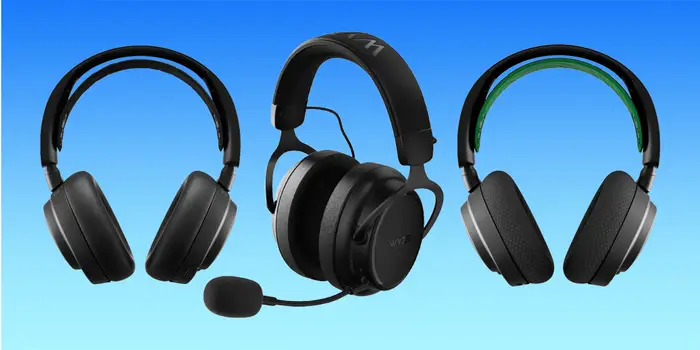
Here’s your quick list to the best gaming headset 2025, covering everything from budget picks to premium wireless upgrades.
Tips for Choosing Your Headset
| Need | Go For |
|---|---|
| Long battery life | HyperX Cloud Alpha Wireless (≈300 h) |
| Premium wireless quality | Arctis Nova Pro Wireless |
| Competitive edge & EQ | Razer BlackShark V3 Pro |
| Budget comfort | HyperX Stinger 2 or Corsair Void v2 |
3. Wrong Audio Format Settings
Sometimes your system outputs audio in a low-quality format.
For example:
- 8-bit telephone quality
- low sample rate
This results in:
- muddy mids
- weak highs
- distorted bass
Fix
Set audio format to:
- 16-bit, 48,000 Hz (DVD Quality)
or
- 24-bit, 48,000 Hz (Studio Quality)
This upgrade alone can make your headset sound dramatically clearer.
At GhettoSmurf Gaming, we believe great gaming should be for everyone, whether you’re a casual player, streamer, or weekend warrior. We’re breaking down the best budget-friendly gaming setups that prove you can save big without sacrificing quality.
4. Your EQ or Bass Boost Is Ruining Sound
We all love bass.
But too much bass drowns out:
- vocals
- footsteps
- game effects
- high-frequency detail
If your sound feels like everything blends together, this is why.
Fix
Disable:
- Bass boost
- Virtual surround
- Loudness equalisation
Then test again.
5. Dirty Headset Drivers
This one surprises people.
Dust, hair and earwax collect in the speaker grill over time and act like a blanket over the drivers.
Result?
You’ll ask yourself, “Why does my gaming headset sound muffled and blocked?”
Fix
Remove ear cushions
Lightly brush the grill
Do NOT use liquid directly
You’ll often notice an immediate improvement.
6. Cable or Port Problems (Wired Headsets)
If the sound changes when you move the cable…
Your cable or port is failing.
Fix Checklist
- Try a different cable (if detachable)
- Plug into the rear motherboard port
- Avoid front PC ports
- Try another device
Front ports on PC cases are notorious for bad grounding and interference.
Looking to upgrade your entire setup? Don’t miss our full guide: How to Build the Ultimate Gaming Setup 2025, exclusively on GhettoSmurf Gaming.
7. Wireless Interference (Wireless Headsets)
Wireless headsets can suffer from:
- Bluetooth interference
- Wi-Fi overlap
- controller signal interference
- distance issues
You may hear:
- crackling
- dropouts
- muffled audio
Fix
Try:
- moving closer
- turning off nearby Bluetooth devices
- changing USB port for receiver
- moving router away
Wireless audio is sensitive, especially cheap Bluetooth models.
8. Game Audio Settings
Some games apply filters like:
- voice processing
- spatial audio
- surround emulation
These can muddy sound and mask detail, and you’ll ask yourself, “Why does my gaming headset sound muffled and blocked?”
Fix
Disable:
- surround simulation
- voice filters
- spatial effects
Then compare.
Here’s how to design the ultimate gaming setup 2025 that balances performance, comfort, and personal style, without breaking the bank. Want more guides like this? Check our Setup Guides and Gaming Gear Reviews at GhettoSmurf Gaming every week for fresh inspiration.
9. Outdated Drivers or Firmware
Modern gaming headsets rely heavily on software.
If your drivers are outdated, audio quality drops.
Fix
Update:
- Windows audio drivers
- headset brand software
- firmware
Most brands release updates that improve sound processing.
10. Your Headset Is Failing
If you’ve tried everything and:
- Sound cuts out
- Only one side works
- The cable is loose
…it may simply be worn out.
Headset drivers degrade over time, especially cheap models.
Quick Fix Checklist
If you want the FASTEST solution:
- Disable hands-free mode
- Switch to Stereo High Quality
- Clean cushions and drivers
- Try a different port
These four fix the problem for most people.
Final Thoughts
Nobody wants terrible audio, especially during intense gaming sessions.
Your gaming headset should give you:
- immersive sound
- competitive awareness
- enjoyable communication
If it suddenly sounds muffled, don’t panic.
With the fixes in this guide, you can restore crisp and clear audio in minutes, without wasting money on a new headset.
At GhettoSmurf Gaming, we’ll keep bringing you the latest tips, gear reviews, and setup ideas to help you level up without emptying your wallet. Stay tuned weekly for more gaming insights!
FAQs
1. Why does my gaming headset sound muffled on PC?
Because Windows may force it into hands-free mode, reducing audio quality.
2. Why does my Bluetooth headset sound bad during games?
Bluetooth limits audio when the mic is active, lowering sound quality.
3. Can worn ear cushions affect sound?
Yes, worn cushions block high frequencies and reduce clarity.
4. Why does my wired headset sound muffled?
Damaged cables or bad ports are common causes.
5. How do I fix muffled audio fast?
Disable hands-free mode and switch to Stereo High Quality.
Why Your FPS Drops in Games (Even With an Expensive High-End GPU) in 2026
Why Your FPS Drops in Modern Games (Even With a...
Read MoreThe Most Anticipated Games Still Coming in 2026
From ambitious RPGs and blockbuster shooters to innovative indie projects...
Read MoreThe Truth About AI in Gaming. Is It Helping or Killing Creativity in 2026?
The Truth About AI in Gaming. Is It Helping or...
Read More